



In today’s digital age, one of the most common questions is which tool is better for writing, Grammarly or Grammarly. Both tools are quite popular and are used daily by writers, bloggers, students, and professionals, but the purpose of both of them is a little different.
In today’s article, we are going to compare what are the special features of Grammarly and ChatGPT and how they help in writing. This will help you understand which tool can be more useful for your work.
Grammarly vs ChatGPT
Grammarly is used by more than 40 million users worldwide. This tool mainly helps improve grammar, spelling, and writing style. If you are writing an article, email, or professional document, Grammarly tells you how to make the sentences better.
On the other hand, ChatGPT is a powerful AI tool that is very strong in creating content, generating ideas, and writing conversations. If you want to write a blog post, create a YouTube script, or want ideas on any topic, ChatGPT is very helpful.

Grammarly focuses more on simple and correct writing. It improves your grammar and sentence structure. While ChatGPT is stronger in content creation and writing concepts.
If you need to polish or correct your writing, Grammarly may be the best option. But if you want to write new content, come up with ideas, or do creative writing, ChatGPT is more useful.
Now the question is: which tool is the perfect fit for your writing style and needs?
But before I get into the comparison, let’s take a quick introduction.
What Is Grammarly?
Grammarly focuses on the correct clarity and accuracy of your writing. I use Grammarly myself to fix the grammar of my articles and improve the flow of my content. It has now become an important part of my daily work.
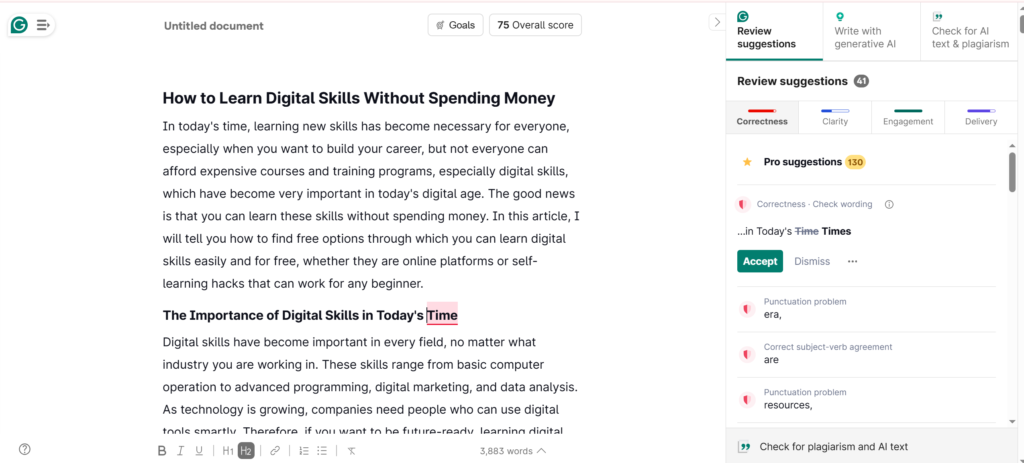
The tool scans your text in real time and identifies grammar errors, spelling mistakes, punctuation issues, and writing style problems. This makes your writing cleaner and more professional. In simple terms, Grammarly works like a personal editor who never sleeps.
When you are working in a hurry and miss a typo or a small mistake, Grammarly catches it. It not only points out the mistake but also suggests better word choices, especially when you are using the same words repeatedly.
Apart from this, Grammarly also helps you in suggesting tone, whether you are Whether you’re writing a formal business proposal or a humorous blog post,
Key Features of Grammarly
Grammar and Spelling Checks: Catches errors in real-time across all your writing platforms
Clarity Suggestions: Helps you simplify complex sentences and remove unnecessary words
Tone Detection: Analyzes your writing tone and suggests adjustments
Plagiarism Detection: Compares your text against billions of web pages (Premium feature)
Style Guides: Ensures consistency with custom brand guidelines (Business plan)
What Is ChatGPT?
ChatGPT is a completely different category of AI writing assistant. Developed by OpenAI, it’s a large language model that can generate human-like text based on your prompts. Unlike Grammarly, which only corrects existing text, ChatGPT can also create new content from scratch.
When ChatGPT launched in 2022, it generated a lot of hype online. Following that hype, I started using it in late 2022. Initially, I used it solely as a Q&A tool. I would ask it fun or random questions and was quite surprised by its answers.
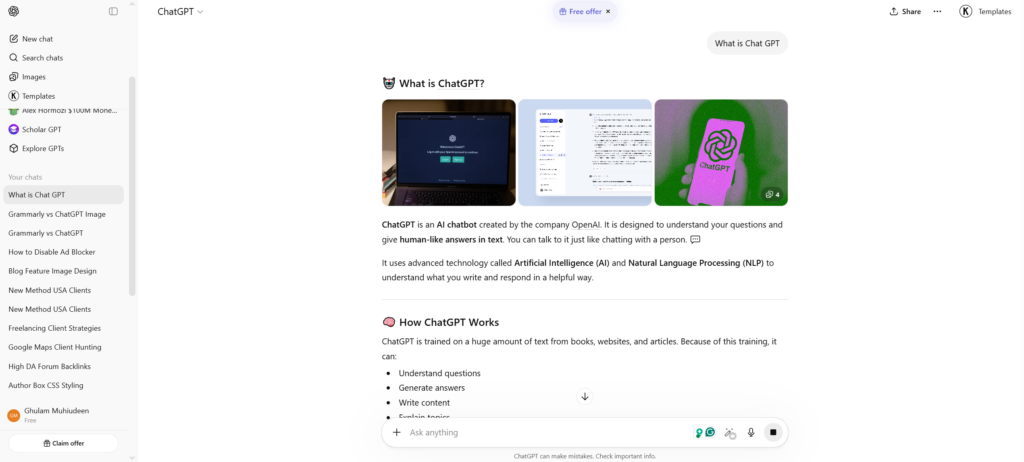
But gradually I realized its true potential. Today, I use it for fact-checking article writing, writing emails, generating article outlines, and getting all kinds of help in my field.
This tool not only helps me rewrite content in a different style, but if you find a complex grammar rule difficult to understand, ChatGPT also explains it to me in simple words.
Key Features of ChatGPT
Content Generation: Creates original text based on your prompts and instructions
Conversational Interface: Allows back-and-forth dialogue to refine outputs
Multiple Writing Styles: Can mimic different tones, voices, and formats
Research Assistance: Summarizes complex topics and explains concepts
Code and Creative Writing: Handles technical and creative tasks beyond standard prose
How Can I Improve My Grammar: ChatGPT or Grammarly?
This is the most important question: how can I improve my grammar? It actually depends on your learning style and goals. Every person’s learning style can be different, so the same tool is not perfect for everyone.
Now let’s understand how these two tools help you improve your grammar skills.
Grammarly for Grammar Improvement
Grammarly teaches you through editorial feedback. When it detects an error, it not only corrects it but also explains why the correction is important. Over time, you begin to understand your mistakes as patterns.
I myself noticed that I often had problems with comma placement in complex sentences. But as I used Grammarly repeatedly, I gradually began to understand the rules and the natural flow of my writing improved.
The premium version of Grammarly provides even deeper explanations. It not only tells you what’s wrong, but also explains why it’s wrong and how to avoid making similar mistakes in the future. In this way, you’ll gradually understand both writing and grammar better.
ChatGPT for Grammar Improvement
ChatGPT uses a slightly different approach to grammar. It not only corrects mistakes but also tells you what can be improved and what new things can be added. You can understand any grammar concept in detail through it. It also guides you on which wording would be better to use next time, which style to choose and which approach is best for which type of content.
In simple words, it becomes a kind of home tutor for you. If you are confused on any topic, like the subjunctive mood, you can also take a complete lesson with examples from ChatGPT. If you’re not sure when to use “home” or “house,” it can even create a step-by-step, personalized tutorial for you. It clearly explains with examples what’s best to use in which situation.
My Recommendation on Grammarly vs ChatGPT
I often recommend ChatGPT to writers, especially for article writing and Fact-checking. Writers need help with grammar because tenses and grammar rules are very important. Therefore, ChatGPT and Grammarly together help a lot in creating easy and conversational content, so that the reader can easily understand the content.
We do not know how educated or professional the person reading our article or blog is. Therefore, we should write such content which is easy for every type of reader. ChatGPT and Grammarly help a lot in creating easy and simple content.
If you want to improve your grammar, Grammarly can be your daily checker, while ChatGPT can be your tutor. With the help of both these tools, you can improve your writing and easily correct grammar mistakes. ChatGPT also explains the concepts where you are struggling.
The combination of these two not only teaches you, but also improves your English much faster. And the best part is that you also save a lot of time. Therefore, it is better to use both tools together.
Grammarly vs ChatGPT: Side-By-Side Comparison
To help you make an informed decision, here is a detailed comparison of how these tools stack up across key categories:
Feature | Grammarly | ChatGPT |
|---|---|---|
Primary Function | Error detection and correction | Content generation |
Real-time Checking | Yes, as you type | No, requires prompts |
Grammar Explanations | Detailed with Premium | Conversational and customizable |
Original Content | No, only edits existing text | Yes, generates from scratch |
Tone Adjustment | Yes, with suggestions | Yes, through prompting |
Plagiarism Check | Yes (Premium) | No |
Learning Curve | Minimal, works immediately | Requires prompt engineering |
Best For | Polishing existing writing | Creating new content |
Grammarly vs ChatGPT: What Are Their Differences?
Understanding the fundamental differences between these tools helps you choose the right one for each situation. Here are the key distinctions:

1. Core Purpose
- Grammarly functions as an editor. It examines your existing writing and suggests improvements.
- ChatGPT functions as a writer. It creates new content based on your instructions. This distinction determines which tool you should reach for in different scenarios.
2. Interaction Style
- Grammarly works passively in the background. It checks your writing as you type, requiring no additional action from you.
- ChatGPT requires active engagement. You must craft prompts, review outputs, and iterate to get optimal results.
3. Learning Approach
- Grammarly teaches through pattern recognition. You see the same corrections repeatedly and gradually internalize the rules.
- ChatGPT teaches through dialogue. You ask questions and receive customized explanations tailored to your specific confusion.
4. Output Control
- With Grammarly, you maintain complete control over your final text. You accept or reject each suggestion individually.
- With ChatGPT, you surrender some control to the AI. While you can guide the output through prompting, the AI generates the actual words.
5. Accuracy and Context
- Grammarly excels at objective corrections like spelling and basic grammar. It rarely makes mistakes with these rules.
- ChatGPT handles subjective tasks like tone and creativity better, but it can occasionally generate incorrect information or awkward phrasing that requires human review.
Who Is Grammarly For?
Grammarly works very well in certain situations. If you fall into these categories, Grammarly can be a very valuable tool for you.
Professional Writers and Editors
If you’re a professional writer or editor who earns money from writing, Grammarly acts as a safety net. Sometimes, even when you spend hours writing with focus, small mistakes are bound to slip in. Grammarly catches errors you might otherwise miss. I personally use Grammarly on a daily basis to maintain my professional reputation and deliver error-free and polished content to my clients.
Students and Academics
Grammarly is also very useful for students and academics. It not only fixes grammar mistakes but also teaches you proper academic writing style. Its plagiarism checker ensures that your work is original. Grammar explanations also help students gradually improve their writing skills.
Business Professionals
Clear and error-free communication is crucial for business professionals. Grammar mistakes in emails, reports, or presentations can damage a professional image. Grammarly integrates with email clients and document editors, allowing you to maintain professional communication across platforms.
Non-Native English Speakers
Grammarly is also very helpful for those learning English as a second language. It not only corrects mistakes but also provides detailed explanations, allowing users to easily understand important English grammar rules and improving their understanding.
Teams and Organizations
Grammarly is also very useful for teams and organizations. Grammarly Business includes features like style guides and team analytics that ensure a consistent brand voice and tone is maintained across all company communications. This way, the entire team follows the same writing standards, and the content appears more professional and consistent.
It’s often the case that when we’re writing content, we slip in small grammar mistakes. These small mistakes can sometimes make an article appear to be low-quality content. Google also says that content should be of high quality and useful.
If there are too many grammar mistakes in the content, the user experience is poor and the content does not provide that much value. That is why, as a writer and SEO specialist, I use Grammarly in my daily writing so that these mistakes are fixed and the articles become of high quality, rank better in Google and also provide real value to the users.

Who Is ChatGPT For?
In today’s digital world, ChatGPT isn’t just a tool, it’s become a powerful AI assistant that helps people in different fields. People and businesses from all walks of life are using it. Whether you’re a business owner, student, developer, or blogger, ChatGPT improves your productivity and saves you a lot of time. Let’s see who ChatGPT is most useful for.
Content Creators and Marketers
ChatGPT is a powerful brainstorming tool for bloggers, social media managers, and content marketers. The biggest challenge in content creation is coming up with new ideas and overcoming writer’s block. ChatGPT helps solve this problem immensely.
You can use it to generate blog post ideas, write social media captions, create outlines, and improve your drafts. It also helps you fix mistakes in your content and provides new perspectives for creative writing. Best of all, ChatGPT generates multiple variations on a single topic, allowing you to choose the best option for your content. This speeds up the creative process and strengthens your content marketing strategy.
Solo Entrepreneurs and Business Owners
If you’re a small business owner or solo entrepreneur, you know that running a business requires you to juggle multiple roles simultaneously. Sometimes you’re a marketer, sometimes a writer, and sometimes even handling customer support.
In such situations, ChatGPT acts as a virtual assistant. It can help you write website copy, create email newsletters, generate product descriptions, write ad copy, and even prepare marketing content. This way, you don’t need to hire separate staff for every small task, saving you a lot of costs.
ChatGPT for Content Writing
Hiring content writers can often be quite expensive, so ChatGPT becomes a very helpful tool for beginners and small website owners. It can create initial drafts for you, write product descriptions, compose ad copy, and even generate content ideas for blog posts.
If you have a website, ChatGPT can generate almost any type of content for you. But the best approach is to edit the content a bit, add your knowledge and experience, and then publish it. Not everyone can afford to hire a professional writer, so ChatGPT becomes a strong support system for those people.
Students and Researchers
ChatGPT is a powerful study companion for students and researchers. It helps generate research summaries and explains difficult topics in simple language.
Sometimes students have trouble understanding a concept. ChatGPT can explain it with step-by-step examples, making the learning process easier. Best of all, it’s available 24 hours a day, so you can use ChatGPT whenever you need help studying.
Developers and Technical Writers
ChatGPT is also very useful for developers and technical writers. It can generate code snippets, explain programming concepts, and help document complex technical systems.
Sometimes developers need a solution to a specific problem or need to understand a programming concept in detail. ChatGPT provides them with quick guidance. If there is an error in your code, you can submit your code to ChatGPT and have it identify the problem. It can also suggest solutions, rewrite the code, and give you new ideas to further improve your project. It’s also helpful for technical writers as it helps convert technical knowledge into simple and clear language.
Creative Writers
Creative writers, novelists, and storytellers also use ChatGPT, especially when they face a creative block. ChatGPT is a great help with character development, plot ideas, and story brainstorming.
Sometimes, AI generates unexpected ideas that force writers to think in a new direction. This way, writers can expand their creativity and make their stories more interesting.
Real World Example
I’ve been blogging and managing my own websites for several years. I use AI tools daily for blog writing, content generation, and website management. Whenever I need new ideas, I turn to ChatGPT for help.
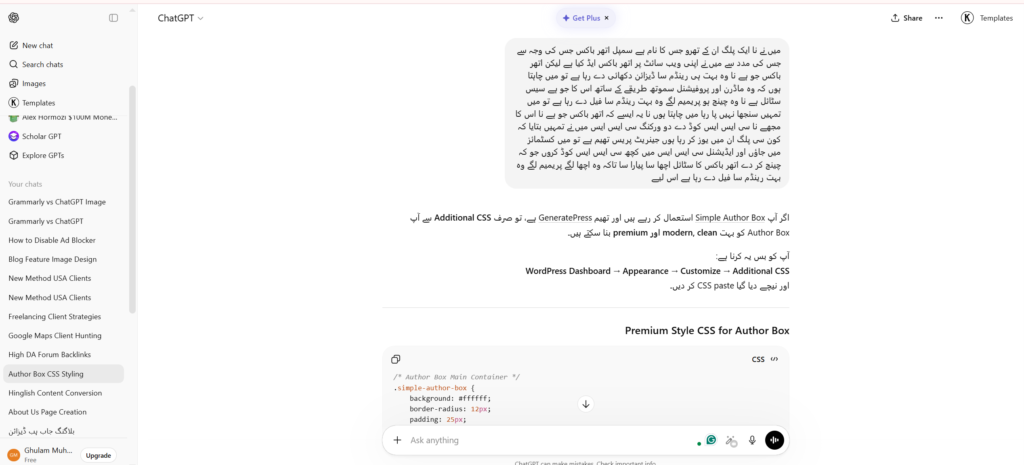
A few days ago, I wanted to improve my website’s design. I told ChatGPT which WordPress theme I was using and that I needed to improve my website’s author box because it looked too generic.
I asked ChatGPT to give me custom CSS code that would give the author box a premium look. They provided me with custom CSS code. Then I went into my WordPress website’s customizer and added the code to the custom CSS section. After that, my website’s author box looked quite premium and professional.
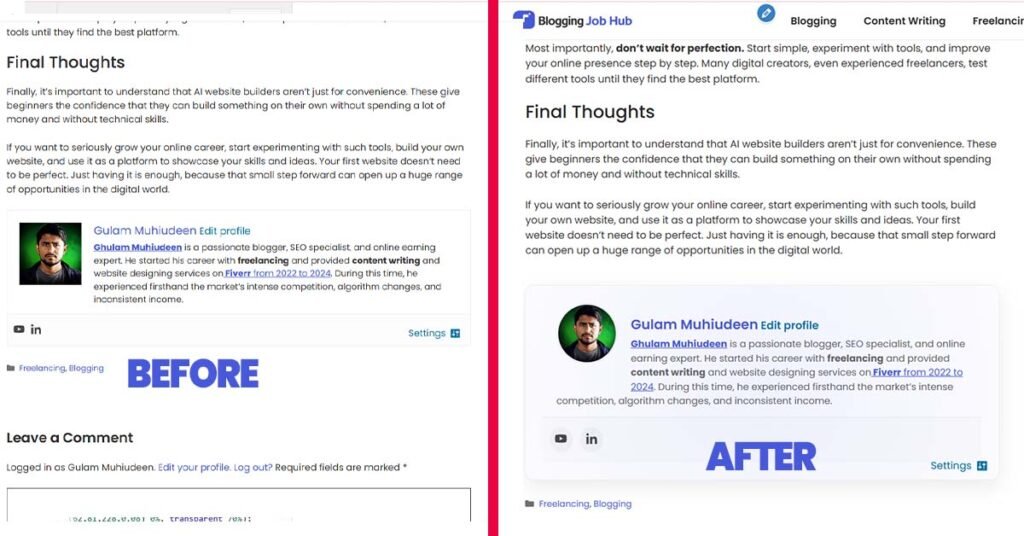
In this way, ChatGPT helped me, and I didn’t even have to write the code myself. If I had hired a developer to do this, I would have had to pay him, even if the work was small.
This example clearly shows that when ChatGPT is used smartly, it can become not just a writing tool but a powerful partner for business growth and creative success. You just need to clearly explain your problem, and in many cases, your work is done in minutes.
Common AI Content Mistakes to Avoid
Many people make a common mistake: they let AI generate all the content and then publish it directly to their blog without checking it. Look, Google doesn’t prohibit AI content, but it clearly states that the content must be high-quality. If you simply take information from a YouTube video, write an article without fact-checking it, and post it on your website, Google considers it thin or low-quality content.
Always remember that tools can never replace your unique expertise, experience, and voice. The best writing always comes from humans who use AI as a tool, not rely entirely on it. Build your topic authority through original research and genuine insights. Your audience will notice the difference.
Frequently Asked Questions
Can ChatGPT replace Grammarly?
No, ChatGPT cannot fully replace Grammarly. While ChatGPT can correct grammar when asked, it lacks the real-time checking, detailed explanations, and seamless integration that make Grammarly efficient for editing. Use ChatGPT for content creation and Grammarly for proofreading.
Is Grammarly better than ChatGPT for grammar checking?
For pure grammar checking, yes. Grammarly specializes in identifying and explaining errors instantly. It integrates with your writing environment and provides one-click corrections. ChatGPT requires manual prompting and comparison to achieve similar results.
Can I use both Grammarly and ChatGPT together?
Absolutely, and I recommend it. Use ChatGPT to generate drafts and brainstorm ideas. Then use Grammarly to polish and perfect your final text. This combination leverages the strengths of both tools.
Which tool is better for academic writing?
For academic writing, Grammarly is essential for catching errors and checking for accidental plagiarism. ChatGPT can help with outlining and understanding concepts, but never submit AI-generated content as your own original work. Always follow your institution’s policies on AI assistance.
Is Grammarly Premium worth the cost?
If you write professionally or academically, Grammarly Premium pays for itself quickly. The advanced suggestions, plagiarism checker, and detailed explanations justify the investment. For casual writers, the free version provides substantial value.
Will AI tools like ChatGPT make human writers obsolete?
No. AI tools augment human writers but cannot replace the creativity, emotional intelligence, and domain expertise that humans bring. The writers who thrive will be those who learn to use AI effectively while developing their unique voices and perspectives.
Final Thoughts: Making Your Choice
I’ve been writing content for the past five years. When I started blogging, I used Grammarly to improve my articles, fix grammar mistakes, and improve readability.
Then, when ChatGPT came along, it completely changed the game. It created a lot of new opportunities for a writer. I saw a lot of potential in it, so I started using it as well. After using both tools, my honest opinion is that these tools are not competitors, but rather complement each other.
Grammarly does exactly what it promises: making your writing clear and professional. It catches grammar mistakes, explains rules, and ensures polished final content. Every serious writer should have Grammarly installed and active in their system.
On the other hand, ChatGPT acts as the brain of content creation. It opens up new possibilities for brainstorming and learning. It speeds up your workflow and helps overcome creative blocks. But it’s important to use it effectively.
Finally, I’d say use both Grammarly and ChatGPT together. They not only improve your content but also save you a lot of time.
Now, I want to know from you: how do you use Grammarly to fix your content, make it more human, and relatable? Be sure to share your feedback in the comments section.

Other Articles

How to Make Money Online Article Writing From Home
How to Create Your Own Website Using AI




No Comment! Be the first one.