



Were you guys also looking for a method by which you can create your own free website? You can use AI to create your own free website and this website will not make you pay for hosting or purchase a domain. It will be given to you by default. Yes, I am talking about another AI Powered Website.
Let me clarify, I liked this tool so I thought I should definitely share such a website with you, with which you can create your own free website. Whether it is an e-commerce store, a blogging website, a portfolio website, or any other kind of website. You can create your own free website using AI.
Why Building a Website Is No Longer Complicated or Expensive
Earlier, it used to be that if you wanted to do blogging or website designing, you had to learn it or hire a designer-developer, which cost a lot. But after the advent of AI, it has become very easy. Now everyone can create their own website.
If you’re trying to build an online presence but feel stuck because of hosting costs, domain fees, or technical skills, trust me, you’re not alone. Many beginners think that building a professional website requires either a lot of money or coding skills. But today’s reality is a little different.
Also Read: Why Every Freelance Needs a Website
You can create a fully functioning website without buying hosting or a domain. This makes it much easier for beginners, freelancers, and digital creators to start their online work.
What Is Wegic AI and How Does It Work?
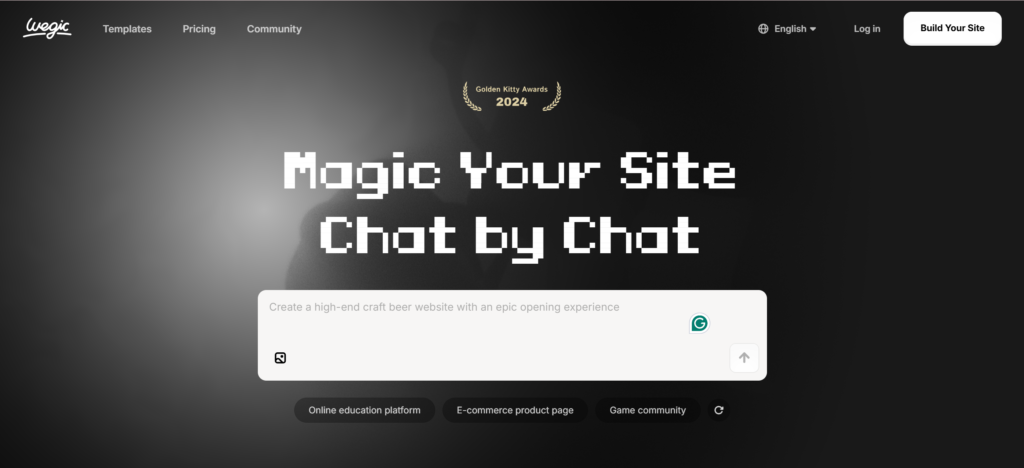
An interesting tool that does this is called Wegic AI. This platform allows you to create a complete website with the help of AI, without any coding knowledge. The most interesting thing is that the process is quite simple. You don’t need to design everything manually. The AI automatically generates the website’s structure, design, and sometimes even basic content.
What Types of Websites Can You Create?
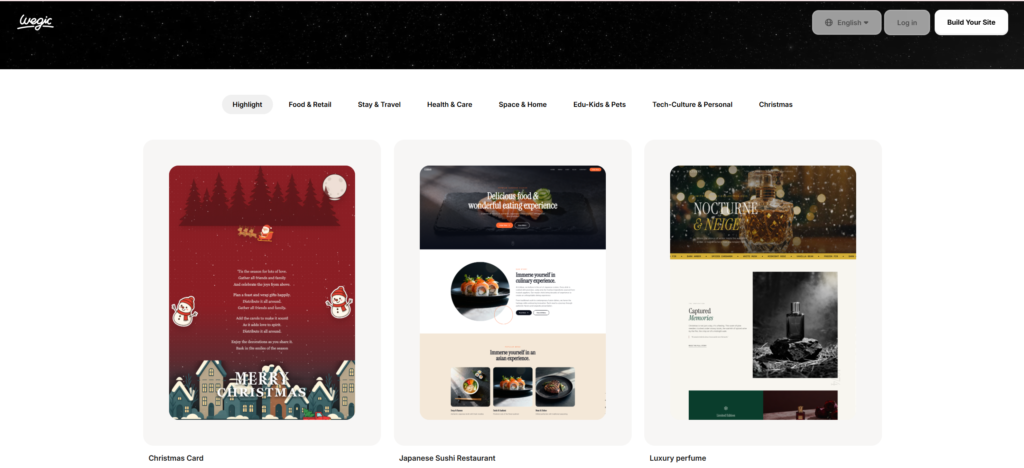
When you open the platform, you’ll find various options for creating a website. Templates for different types of websites are available:
- Blogging website — blog templates are ready to use
- Portfolio website — showcase your work with clean templates
- E-commerce store — sell products online easily
- Product showcase website — display what you offer
- Service website — promote your services
- Business landing page — create a professional first impression
Why This Tool Is Perfect for Freelancers
This is especially useful for freelancers. When you target international clients, especially those in the USA, clients often ask for a portfolio. If you have a simple and clean website where you can showcase your work, trust is automatically built. Sometimes even a basic portfolio website is enough to convince a client.
How to Generate a Website Through AI Chat
Another interesting feature of this tool is that you can generate a website through AI chat. This means you don’t even need to manually select a template. You simply tell the AI what type of website you want to create.
For example, if you want to create an educational website where learners can explore online courses, you simply describe the idea to the AI.
What Happens Next?
The AI then asks you some simple questions to better understand your requirements, such as:
- What type of audience you want to target
- What features you want on your website
You can add features like:
- Course search option
- Payment integration
- Testimonials
- FAQs
- Product display
The system automatically generates pages after you make a few selections. Usually, the AI also automatically creates important pages on your website, such as the homepage, about page, and details page.
Can You Customize the Website After It’s Generated?
The best part is that everything is customizable. Even after the website is generated, you can:
- Change text
- Replace images
- Edit sections
- Add new sections
- Have the AI regenerate a section
This way, beginners don’t have to worry about technical editing tools.
Use a Reference Website to Build Your Own Design
How Does This Feature Work?
Another powerful feature of this platform is that you can create your website using a link to a reference website. Suppose you like a website design on the internet. Normally, if you want to copy that design, it takes a lot of time. But here, you simply provide the link to that website as a reference.
The AI analyzes the structure of that website and generates a new website with a similar design in the same style. Obviously, this isn’t an exact copy, but a similar design concept that you can customize with your brand name and content.
This feature is very helpful for beginners, as people often know the type of website they want, but the design isn’t clear. AI tools generate a professional-looking layout in such situations.
Preview, Edit, and Publish Your Website
Once the website is generated, you can preview it. You can check how it looks on desktop and mobile. Mobile responsiveness is very important these days, as more people visit websites on mobile. AI automatically creates responsive designs so that the website looks good on every screen.
Editing Is Simple
Within the editor, you can change content by clicking on any text area. You can:
- Upload images
- Replace sections
- Have AI generate new content
Even if you’ve never built a website, the editing process feels quite simple.
Useful Elements You Can Add
The platform also gives you the option to add elements like:
- Product listings
- Signup forms
- Call-to-action buttons
- Contact sections
These features are very useful for freelancers and businesses as they can help convert visitors into clients or customers.
Publishing Your Website for Free
Once you’ve customized your website, the next step is publishing. The platform also provides you with a free domain address with which you can launch your website. This means you don’t even need to purchase a domain initially. Later, if you want a custom domain, you can upgrade or connect your own.
Free vs Paid Plan
The free version is usually sufficient for beginners who just want to create a simple portfolio, blog, or demo website. If you choose a paid plan, you get additional features like:
- Custom domain
- Advanced design options
- Payment integrations
- Analytics insights
- Ability to publish unlimited pages
How Freelancers Can Grow Using a Simple Website
For freelancers and online workers, even a simple website can be quite powerful. When you share your portfolio link with a potential client, it looks much more professional than sending screenshots or random links.
Many successful freelancers started this way. They created a simple website where they shared their services, past work, and contact details. Then, as they gradually acquired clients, they upgraded the website and added new features.
The Most Important Lesson for Beginners
The most important lesson is that getting started online is no longer so complicated or expensive. AI tools are making it very easy for beginners to create websites, portfolios, and online businesses.
If you want to start freelancing, blogging, or building your personal brand, creating your own website can be the smartest first step. It builds your credibility, showcases your skills, and presents a professional image to clients.
Most importantly, don’t wait for perfection. Start simple, experiment with tools, and improve your online presence step by step. Many digital creators, even experienced freelancers, test different tools until they find the best platform.
Final Thoughts
Finally, it’s important to understand that AI website builders aren’t just for convenience. These give beginners the confidence that they can build something on their own without spending a lot of money and without technical skills.
If you want to seriously grow your online career, start experimenting with such tools, build your own website, and use it as a platform to showcase your skills and ideas. Your first website doesn’t need to be perfect. Just having it is enough, because that small step forward can open up a huge range of opportunities in the digital world.

Other Articles
Grammarly vs ChatGPT: What You Really Need?
New Method to Find Unlimited USA Clients Using Y Combinator




No Comment! Be the first one.