Why Every Freelancer Needs a Personal Website to Succeed Online
In this digital world, freelancing has become a proper profession to earn money online, but just offering quality services is no longer enough. Every freelancer needs a professional website for one simple reason.
It builds trust, attracts clients and gives you complete control over your career. You build trust, create your brand identity, get more clients than Google, and you can also work outside marketplaces which makes you independent. You can convert your visitors into clients.
Freelancing is very competitive and the income is not consistent. If you get an order today, it doesn’t necessarily mean that it will keep coming regularly in the coming months. And a personal website gives you complete control.
If you are still relying only on social media or freelance marketplaces, you are missing out on huge opportunities. Let’s explore what every freelancer needs and why a personal website is important.
Why Freelancing Platforms Alone Are Not Enough
There is no doubt that platforms like Upwork and Fiverr have made freelancing quite easy, whether you are a writer, designer, developer, artist or in any skill-based profession. These freelancing sites operate as self-contained platforms, where Upwork is a one-stop shop for everything.
When I started freelancing, I thought a strong LinkedIn profile and profiles on Upwork and Fiverr would be enough. I thought, “Why do I need a personal website? It’s only for big agencies and tech companies. What benefit would it bring?”
- How to Get Your First Order on Fiverr
- Direct Clients vs Freelance Platforms – Which Is Better?
- How to Get Blogging Clients Without Freelancing Platforms
I was wrong. Because of this mistake, I lost the trust of my clients, and honestly, I wasn’t able to earn enough money. That’s why in this article I am going to tell you why it is important for a freelancer to create his own website.
What Is A Personal Website?
A personal website is essentially a collection of web pages about your work, your skills, and other activities that an individual creates for and about themselves. The purpose of these pages can vary, depending on the website’s purpose, interests, and intent.
Generally, a personal website is informational, but it can also be used to:
- Entertain people
- Market or sell products or services
- Social networking
- Personal career marketing
- Express their opinions
But most importantly, it’s the best way to showcase your skills, and freelancers should do this to attract more clients.
Why Every Freelancer Should Have a Personal Website
Now that we live in the age of AI, freelancing has become even more competitive and will only get more difficult. Previously, if someone had only basic skills like article writing or image editing, AI can now handle these tasks. In such a situation, if you want to stand out in the market, your website is a huge help.
Whether you’re a freelancer, graphic designer, blogger, video editor, or social media marketer, it’s undeniable that finding clients has become one of the toughest things these days. Standing out in this situation should be a priority, and the best way to do that is to have a personal website where you can easily show potential clients what you do and how you can help them grow their business.
So, how exactly does a personal website help?
1. Your Personal Website Is Your Digital Home Base
Think of it this way: Social media platforms are like rental apartments. They don’t belong to you.
- Instagram can change its algorithm at any time
- LinkedIn can limit your reach
- Upwork can also suspend your account
But your personal website is yours. You can change it at any time. You can manage it the way you want. When someone Googles your name — and trust me, many clients do — your website can show up there. This is a place where you have complete control.
It’s a place that showcases your work, tells your story, and gives clients a reason to hire you. A personal website is crucial to your freelance brand.
- It gives you a professional online presence that platforms like Fiverr or Upwork can’t replace
- It gives you the opportunity to tell your unique story in your own voice
- It positions you as a serious professional, not just someone looking for gigs
- And best of all, it works for you 24 hours a day, even while you’re sleeping
I created my own websites. Whenever a client reaches out to me, or I contact one directly through client hunting, the first thing they want to do is see my portfolio or my website. Then I show them my website.
I provide services ranging from article writing to web designing. When clients see my work on my website, their trust is built and they also understand that I can do their work properly.
This is the power of your personal website, which you don’t get to see on freelancing platforms.
2. It Builds Trust and Credibility Instantly
Ask yourself a simple question: If a client doesn’t know you, why would they pay you? If they don’t know you, why would they trust you? Thousands of people are providing the same service as you. So why would a client choose you? What compels a client to make an advance payment online?
The answer is credibility.
A well-designed, professional personal website immediately signals that this person takes their work seriously. When clients visit your site and see your portfolio, testimonials, a clear About Me section, and real contact information, the risk of trusting a stranger on the internet is significantly reduced, and trust begins to build.
If I were to hire a freelancer today as a client, I would think about a few basic things:
- Is this person real?
- Does he or she have experience?
- Has anyone worked with him or her before?
- Does his or her style match my requirements?
If you have a website, your website answers all of these questions. You don’t need to explain it to the client separately.
If you don’t have a website, you’re essentially telling the client to trust you blindly.
A personal website strengthens your freelancing, strengthens your position, and builds trust in the client.
3. A Portfolio That Actually Showcases Your Best Work
This is something no one tells you at the start of your freelance career. Where you showcase your work is just as important as the work itself.
- Sending a link to a Google Drive filled with random files isn’t very impressive
- Showing someone your Behance or Dribbble profile is a little better, but still not ideal
- However, having a properly curated portfolio on your website is considered the gold standard
How to Use Your Website Portfolio to Win Clients
When I have a portfolio section on my website and I show my portfolio to clients, it first builds trust and makes them realize I can do this work.
Then their direct question is: Can you do this for me? Their point of view changes. They don’t ask if you can do it, but rather, can you do it for me. Their doubts are cleared.
To improve your portfolio, you should:
- Create case studies for each project that clearly explain the main problem, your process, and the final result
- Place these in the portfolio section of your website along with client testimonials and related work
- Where possible, show before-and-after comparisons
Always highlight some of your clients’ problems. Whatever their main problem is, highlight it and explain how you can provide a solution. Also, include your recent project as proof to build trust and convince the client that you’re the right person for their job. This way, you can give them a strong reason to hire you.
4. SEO: Let Google Send You Free Clients
The biggest advantage of creating your own website is that you can get a lot of traffic from Google and convert your visitors into clients without any paid marketing. Organic search traffic is free. When your personal website is optimized for search engines, Google can send potential clients to you without spending a single rupee or dollar on ads.
Real-Life Example
I published a post on my blog titled “How to Start a Blog and Earn Money with WordPress.” In it, I explained in detail how you can set up your blog and install WordPress. I explained everything step by step in detail. This article ranked on Google.
I also made a video on YouTube on this topic.
Within a few months, my website ranked on Google. Then, I received an inquiry from an Indian startup founder who wanted to build his website. We worked together for over a year.
That client didn’t come from Upwork, or even LinkedIn. He came from Google because my website was ranking there.
SEO Basics for Freelancers
You don’t need to be an expert for this. There are some simple things you can do:
- Use your location as a keyword along with your niche, such as “freelance web designer in New York” or “remote content writer for SaaS companies” — this way, you target local SEO
- When a client searches Google and your website is found using relevant keywords along with location, your website is more likely to rank high in local SEO
- Publish helpful blog posts in your area of expertise so that every visitor has a chance to convert into a client
Over time, your website can become a client-generation machine of sorts. And honestly, this can be a very strong way to grow your freelance career. This is the biggest advantage of having a website.
5. You Control Your Rates — And How They’re Perceived
There’s a huge difference between a client finding you on their own and finding you on your website, and a client finding you on a freelance platform like Upwork or Fiverr.
The Problem with Freelancing Platforms
- These platforms typically charge a fee of around 20%
- This fee is charged to the client, and a commission is also taken from the freelancer
- Because of this, as freelancers, we earn less
- Payments are subject to deductions, and charges are levied both when the payment is released and later when we transfer it to our local account
Another major issue is that competition on freelancing platforms is intense. Sometimes you have to lower your pricing to compete with others. Often, you have to keep your pay quite low.
The Power of Your Own Website
In contrast, when you work through your website, you’re not directly competing with anyone. Everything is in your control. You can make demands from clients as per your wish. When a client views your website, sees your work, and convinces them through your portfolio and content that you can solve their problem, you can increase your rates three to four times.
Positioning Yourself as a Premium Freelancer
- Be confident and clear on your website
- Clearly display your pricing, starting rates, or budget range so clients are automatically filtered
- Be sure to add social proof, such as mentioning your work with clients
- Get reviews from clients — if possible, get video reviews
Sometimes, just seeing a text review can make a client think the website owner wrote it themselves and it might not be genuine. But video proof builds trust significantly. This way, when clients receive strong proof and feel your services are in high demand, they’re more likely to agree to your rates.
These are all signals your website sends to clients. And if you use them correctly, you can take full advantage of them.
6. It Prepares You for the Future of Freelancing
It’s widely claimed that the freelancing economy is growing rapidly. More people are working independently than ever before. Earn money from home. Start earning with minimal skills. But the truth is, it’s not that simple.
You depend on algorithms. Sometimes you earn thousands of dollars from your profile, and sometimes you don’t receive any orders at all. The point is that freelancing earnings aren’t consistent. And no matter how much work you do, you can’t build your personal branding on freelancing platforms. You’re known there only as a profile.
Your personal website is the foundation of your personal branding. Everything ties in here:
- Your social media
- Guest posts
- Podcast appearances
- YouTube videos
The final destination should all be your website.
When you invest in your personal website today, you’re actually investing in the future version of your freelance career. Therefore, you should also work outside of freelancing platforms. Try to find direct clients, and the best way to do this is to create your own website.
You can also monetize your personal website through Google AdSense and other advertising platforms. This way, even if you’re not freelancing, you can still earn money from your website.
Focus on creating your website and always build a system that makes your earnings more consistent.
How to Create Your Personal Website (Step-by-Step Guide)
Now you understand why a website is important, but you might not know how to create one. You don’t need to be a tech genius. Just follow this simple roadmap.
Step 1: Choose Your Domain Name
First, choose a domain name that is easy to pronounce, professional, and short. My recommendation is to use your name, but it’s even better if you choose a brandable name. For example, I chose MohiRDO.com for my portfolio, which is short for my name.
- You can buy a domain name from Namecheap
- GoDaddy is also a popular option
- Hostinger is a great option for hosting
- Try to get a .com domain, as it helps build trust
Step 2: Pick Your Website Platform (No Coding Required)
There are many platforms available these days where you can build your website, such as WordPress, Squarespace, and Wix. But if you’re a beginner, my recommendation is WordPress. It offers ready-made designs and themes. You just need to update your information and content. This is quite simple for beginners.
Step 3: Set Up Your Hosting for WordPress
If you choose WordPress, you’ll need hosting. Other platforms have different fees, but with WordPress, you primarily need hosting.
I personally use Hostinger and recommend it to beginners, but you can choose any hosting plan of your choice:
- Visit Hostinger and choose a Premium or Business plan
- You can also register your domain name for free at checkout
- Complete the payment, then log in to your Hostinger dashboard
- Install WordPress — this process takes only 2 minutes and requires no technical knowledge
- Simply set your WordPress username and password and click install
After that, you just need to design your website.
Step 4: Install a Theme and Make It Look Professional
Once WordPress is installed, log in to your dashboard. Your dashboard is located at yoursite.com/wp-admin. Log in by entering your username and password.
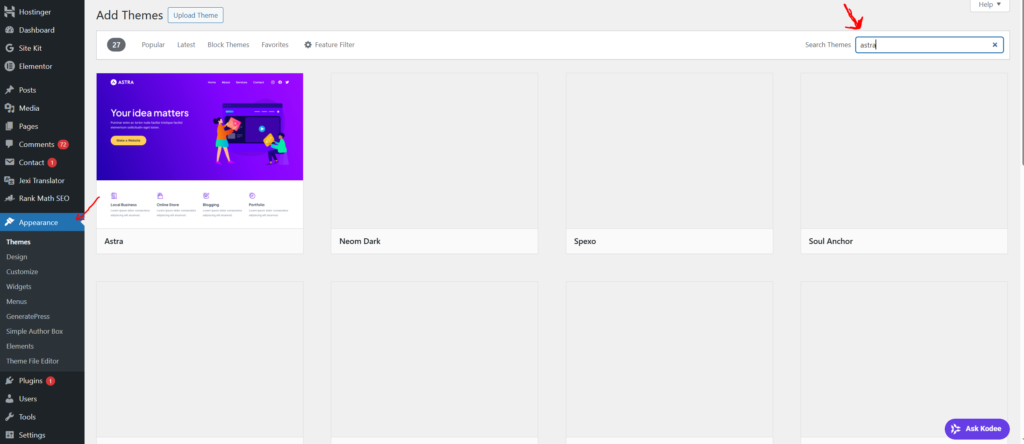
In the dashboard, go to Appearance → Themes and install a free professional theme. Lightweight and easy themes like GeneratePress are great for beginners. After installing the theme, you can customize the colors, fonts, and layout to suit your brand.
Step 5: Create Your Core Pages
Now the most important task is to create the basic pages of your website.
Homepage
The home page is the most important because it’s the first impression. Keep it clear and focused. Visitors should understand who you are and what you do in just 5 seconds.
You can use a simple formula:
“I am [your name] and I help [target client] achieve [specific result].”
Add a clear button after this, such as “View My Work” or “Let’s Work Together.”
About Page
This page showcases your personality. Write a warm introduction on it:
- Share your story about how you got into freelancing
- Mention your skills and how you can help clients
- Add a professional but natural photo of yourself
Services / Work With Me Page
Clearly state the services you offer, such as SEO, blog writing, or web design:
- Explain what the service includes and what results the client will expect
- If possible, mention a starting price so clients have an idea and can filter their budget
- Add a call-to-action button, such as “Book a Free Discovery Call” or “Get a Quote”
Portfolio Page
Share your best work samples:
- Describe what you’ve worked on with clients and how you’ve helped them
- Clearly showcase the projects you’ve completed
Contact Page
Keep this page simple so that people can easily contact you. Include the following:
- A contact form (you can use a plugin like WPForms in WordPress)
- Your professional email address
- Your response time, such as “I usually reply within 24 hours”
- Optional: LinkedIn or relevant social media links
It’s not necessary to share your personal phone number publicly. An email or contact form will suffice.
Step 6: Optimize for SEO From Day One
You don’t need to become an SEO expert immediately, but following a few basic steps from the beginning will be very helpful in the future.
For WordPress users, install the Rank Math or Yoast SEO plugin. These plugins guide you through optimizing each page.
Basic SEO Checklist
- Add your name and niche to your homepage title, such as “Ghulam Muhiudeen | Freelance Content Writer for Tech Brands”
- Write a meta description for each page
- Use proper filenames for images, such as
ghulam-freelance-writer.jpg - Ensure the website loads within 3 seconds
- Make sure the website works well on mobile devices
- Link your pages internally, such as the homepage to the portfolio and the portfolio to the contact page
Step 7: Launch and Share It With the World
The truth is, your website will never feel 100% ready, and that’s completely normal. Don’t wait for it to be perfect.
Once your basic pages are ready, launch the website.
Website Launch Checklist
- Proofread every page
- Test all links
- Check your website on mobile and tablet
- Submit your sitemap to Google Search Console so Google can index your site quickly
- Share your website link on LinkedIn, Instagram, Twitter, and in freelance communities
- Add the website link to your social media bios, email signature, and freelance profiles
And then celebrate. Creating your freelance website is a big step. You’ve invested in your future.
Final Thoughts
There’s no doubt that freelancing can earn you a good income, but sometimes there comes a time when you feel like you should do something else. In such a situation, creating your own website can be a strong option.
My recommendation is that you work on freelancing platforms while also focusing on direct marketing. The most important thing for this is to have your own website.
Creating another income source for yourself is a much smarter decision than relying solely on freelancing platforms. A successful freelancing career is built not only on hard work, but also on smart strategies. With the demand for freelancing so high, you should also explore alternatives. Personal websites make this possible.
Now that you understand its benefits, start designing your personal website. If you found this information helpful, please share your opinion in the comments section. If you have any questions or doubts, please feel free to ask in the comments.

Ghulam Muhiudeen is a passionate blogger, SEO specialist, and online earning expert. He started his career with freelancing and provided content writing and website designing services on Fiverr from 2022 to 2024. During this time, he experienced firsthand the market’s intense competition, algorithm changes, and inconsistent income.