I’ve been blogging for the past five years, but I initially started with free blogging. Many people can’t get started blogging because building a website is costly. It requires a small investment, and not everyone has the means to invest.
In this article, I’m going to answer a tough question:
How can you start a blog with no money or very little investment? That is, how can you start blogging with almost zero investment?
But one important thing — be sure to read the entire article to understand whether starting a blog without investment is a good idea or whether a small investment is better.
When I started blogging, I started with a free blog and subdomain on Blogger.com. After starting with Blogger, today I host more than 5 of my websites on WordPress.
In this article, I will share my blogging journey and the entire process so that you can also start blogging easily.
Why Should You Start a Blog?
If you’re searching for ways to start a blog for free, it likely means you already have some idea of its potential. However, I still want to highlight a few important points.
You can consider a blog a digital asset. It can be sold, rented, or generated as a recurring income by promoting products and services within the content.
Here are a few key reasons why blogging is worth your time:
Today, approximately 90 percent of people read reviews online before making a purchasing decision, and blogs are a trusted source for them. This offers high potential for earning affiliate commissions.
You can earn money by displaying ads on your blog through Google AdSense, which is also a popular way to earn money from a blog.
If you rank first on Google for a keyword, that content can become a money-making machine.
A blog helps you earn money, and income continues to be generated on autopilot.
Just as you just visited my website, a blog brings potential readers and customers to your website. It then introduces them to the services and tools they’re searching for, and through this process, the blogger can earn additional income.
Keeping all these points in mind, blogging is not just a game of writing content, but it is a real marketing system that helps in starting online income.
In simple words, the shortcut formula of blogging is this: Help your users and earn from that help through blogging.
Where to Start a Free Blog?
To avoid your confusion, I have listed three free platforms in detail from where you can start blogging. Later, it is suggested that the blog be migrated to a paid platform.
First of all, understand one important thing. Every blog requires three basic things to start:
Reliable hosting
Domain name
SEO optimized theme
Now when it comes to starting a blog without investment, it means that we try to get these three things 100% free. So let’s start now.
#1: Start with Blogger.com
Blogger is a Google product launched in 2003 and offers unlimited hosting.
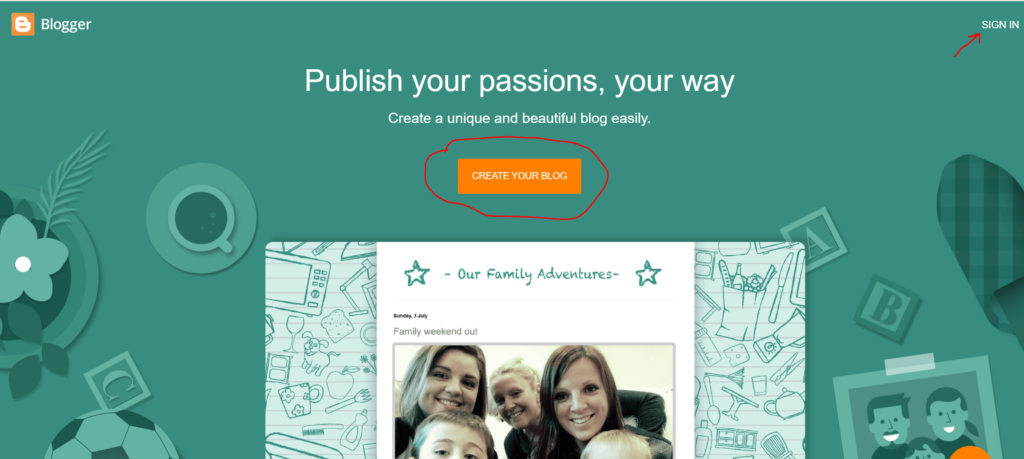
To set up a blog on Blogger, you simply need a Google account or Gmail ID. Go to blogger.com, navigate to the home page, and sign up — that’s all it takes.
Benefits of Blogger
Unlimited Hosting: No hosting worries at all, Blogger offers unlimited hosting.
High Security: Your website will remain secure, so don’t share your confidential information with anyone.
Free Subdomains: Blogger offers free subdomains like yourname.blogspot.com. This is great for learning, but not recommended for long-term use.
Custom Domains
It’s best to purchase a custom domain, which is easily available from Namecheap or Hostinger. The brand name should be unique and of your choice.
If you choose a relevant domain after doing a little research and keyword research, you can achieve good rankings on Blogger.
Themes for Blogger
Blogger only has 5-6 default themes available, which aren’t very useful and don’t have the best design. You can use a customized theme. There are many websites on the market that provide free Blogger themes.
Visit: this link for free blogger templetes
Grab the theme of your choice and upload it in the Blogger theme customization section. Once you do this, you’ll be ready to start writing and publishing content.
If you’re choosing Blogger, watch my YouTube video, which explains complete theme customization, Blogger settings, and step-by-step setup so you don’t have any problems in the future.
Must Read: Are You Really Too Late to Start Blogging
#2: Start with WordPress.com
You must have heard about WordPress because most of the websites in the world are built on WordPress. Many of the world’s biggest websites use WordPress. It is a Content Management System (CMS) that you can use for free.
However, there are two versions of WordPress: WordPress.com and WordPress.org. So the question is, which one should you start with if you want to begin for free?
WordPress.com includes hosting already but has significant limitations in customization, plugins, and monetization.
WordPress.org requires you to purchase your own hosting but offers full control, plugins, and more earning options.
WordPress.com offers free hosting, but it also has its own pricing plans and several limitations. The main reason many people avoid WordPress.com is the lack of monetization freedom. To monetize your blog, you usually have to upgrade to a monthly subscription. Ads may appear on your blog, and the revenue from those ads goes to WordPress.
Another limitation is plugins. You cannot install plugins on the free plan, and plugins are very important for blogging because they add essential features and functionality to your website.
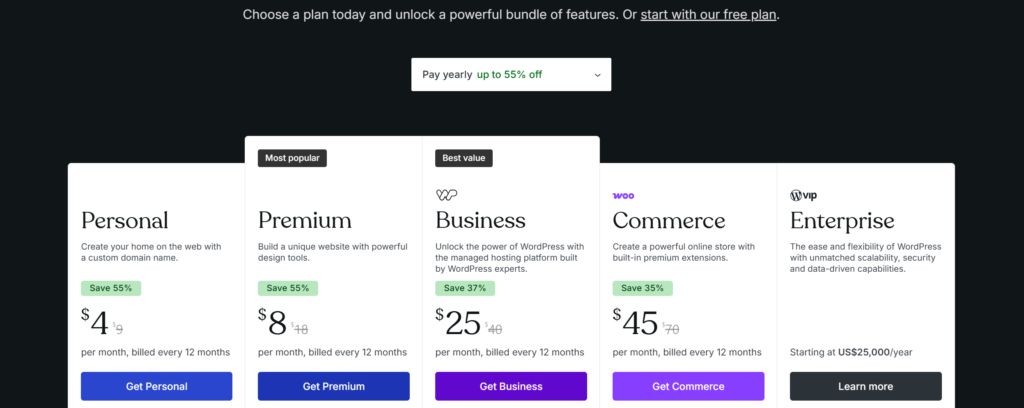
So, should you start with WordPress.com? My suggestion is absolutely not.
Why not use WordPress.com?
Then Why Mention WordPress.com at All? The reason is simple. If you use WordPress.com, you can become familiar with how WordPress works and later migrate to WordPress.org anytime.
If you buy hosting for a whole year and then start learning how WordPress works, a lot of your time will be wasted. As beginners, many people don’t fully understand blogging at the start, and blogging is not a quick-rich scheme. It takes time to learn and grow.
That’s why using WordPress.com in the beginning can be helpful. You can learn how WordPress works and understand its features without spending money on hosting.
Later, when you upgrade to WordPress.org, the process will become much easier for you. After buying hosting, you can directly install WordPress and start working on your blog instead of spending time learning the basics.
So, the reason I recommend WordPress.com is not to build your long-term blog there, but to use it as a learning platform so you can understand WordPress properly before moving to WordPress.org.
#3: Start a Free Blog with Medium.com
Medium is one of the best platforms for blogging where you can write about almost any niche. You just need to create a free account and start publishing blog posts. However, keep in mind that you cannot earn money through ad revenue directly from Medium. One common way to monetize is by using Medium to drive traffic to your own monetized blog.
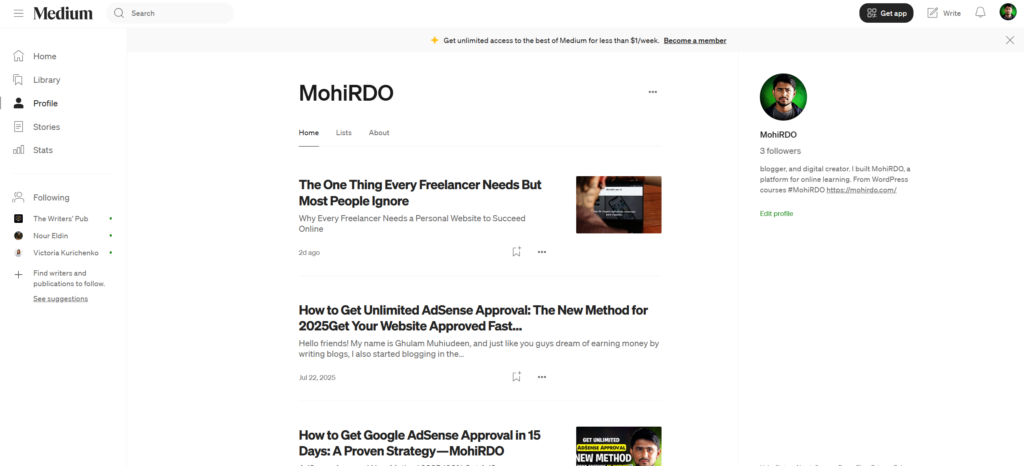
There are several strong reasons to use Medium.com:
Unlimited Hosting: You don’t have to worry about hosting at all, although custom domains are not allowed.
Built-in Community: Medium helps promote content through its platform and email recommendations.
Strong Domain Authority: Medium already has strong domain authority, which means your content can rank faster on search engines with less effort. You may have noticed that Medium articles often appear on the top pages of Google.
That’s why I recommend creating a Medium account and using it as a secondary blog. Even if your primary blog is hosted somewhere else, you can still use Medium to send traffic to it.
#4: Other Free Ways to Start a Blog
There are also other free blogging platforms that people use to start their blogging journey. The platforms listed below aren’t 100% foolproof blogging solutions, but many people use them as website builders. They’re primarily used for website design, not serious blogging. They’re not recommended for building your own blogging website.
However, since our topic is about setting up your own blog where you can earn money, it’s important to briefly discuss these platforms as well.
Wix.com
Wix is a website builder solution. It’s especially useful when you want to design a custom website for your business. Yes, you can publish content on it and even create a free account without a credit card. But like WordPress.com, it also has several limitations. The free plan doesn’t allow you to use your own custom domain, and monetization options are limited.
Weebly.com
Weebly’s solution is similar to Wix, with slight differences in pricing and features. Hosting is included with the free plan, but the option to connect a custom domain is available only when you upgrade. It features a drag-and-drop page builder that allows you to easily design custom pages. You can also monetize your blog through sidebars, media boxes, and ad spaces.
But remember one important thing: most useful features are unlocked only when you upgrade to the Professional plan, and their features also change over time.
In short: These platforms are beginner-friendly by design, but not a reliable option for serious blogging and long-term monetization.
WordPress.org — The Ultimate Solution to Start a Blog
The platforms I’ve mentioned are great for starting a free blog. But just like in real life, if you’re running your own business, you want your shop to be more beautiful and stand out from your competitors — whether it’s a clothing store, a pet store, or any other business.
Similarly, when we create our own website online, it should be professional, attractive, and different from others. This is how we manage competition, rank on Google, and present ourselves as professionals.
It’s best to start with a free blog because it helps you learn what blogging is, how to do it, how to set it up, and what the requirements are. Eventually, a time comes when you realize you need to run your business professionally.
At that point, you’ll need to invest a little budget. If you have the budget to start with, I suggest you go straight to WordPress.org. Here, you get complete freedom and almost all the features.
Now, with the help of AI tools, website design has become quite easy. Times have changed, and even your competitors are using these powerful tools to improve their websites. So now is the time to present yourself as a professional.
How to Set Up a Blog with WordPress.org
If you want to set up a blog on WordPress.org, I’ve provided a step-by-step guide below to easily set up your professional blog.
Step 1: How to Buy Hosting
First, you need to get hosting. You can directly visit Hostinger’s website. There, you’ll see different hosting plans. Their prices fluctuate slightly over time.
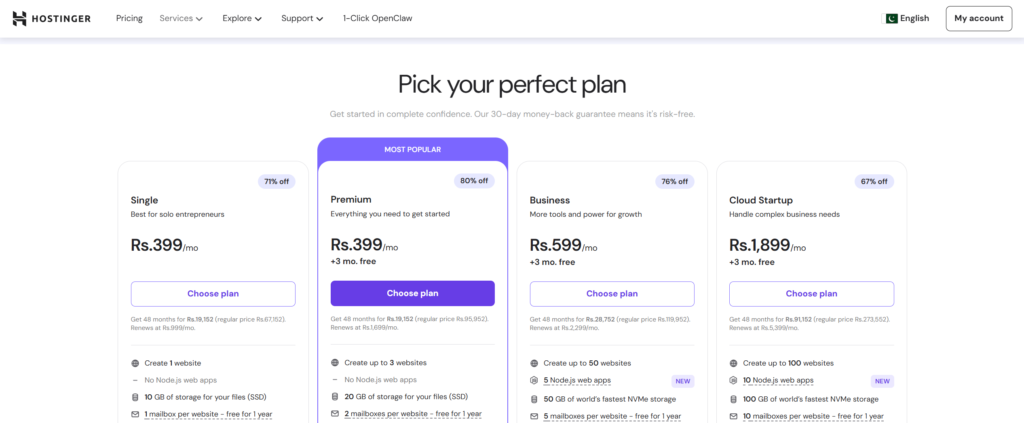
It’s generally recommended to choose the recommended plan. If you’re just starting out and have a small budget, I recommend the Business plan. The Business plan also offers AI features that make website design and management easier. If you want to do more advanced things in the future, this plan will be better for you.
Three Ways to Buy Hosting
Buying directly from the website — You can purchase a plan directly from the hosting company’s website.
Through an affiliate link — If you buy through a creator or blogger’s affiliate link, you can sometimes get an extra discount along with a promo code.
Through a referral link — You can also get a 20% or higher discount through a referral link.
Affiliate Link vs. Referral Link — What’s the Difference?
You get a discount in both, but a referral link has an extra benefit. If for some reason you don’t like the hosting, the website design or the business plan changes, you can claim a money-back guarantee.
I purchased my first hosting through a YouTuber’s affiliate link. Later, for some reason, I wanted to claim a money-back guarantee, but I was told that since the hosting was purchased through an affiliate link, I was not eligible. Then I realized that I should check first. That’s why I am sharing my personal experience.
So I recommend that you buy hosting through a referral link. This also gives you a discount, and if any issues arise in the future, you can claim a money-back guarantee and get your payment back.
Hosting Purchase Process
Select your plan.
Add your personal details.
Complete the payment process (you can also pay in local currency).
After purchasing hosting, you’ll be taken to the hPanel dashboard. There, you’ll see the one-click WordPress installation option.
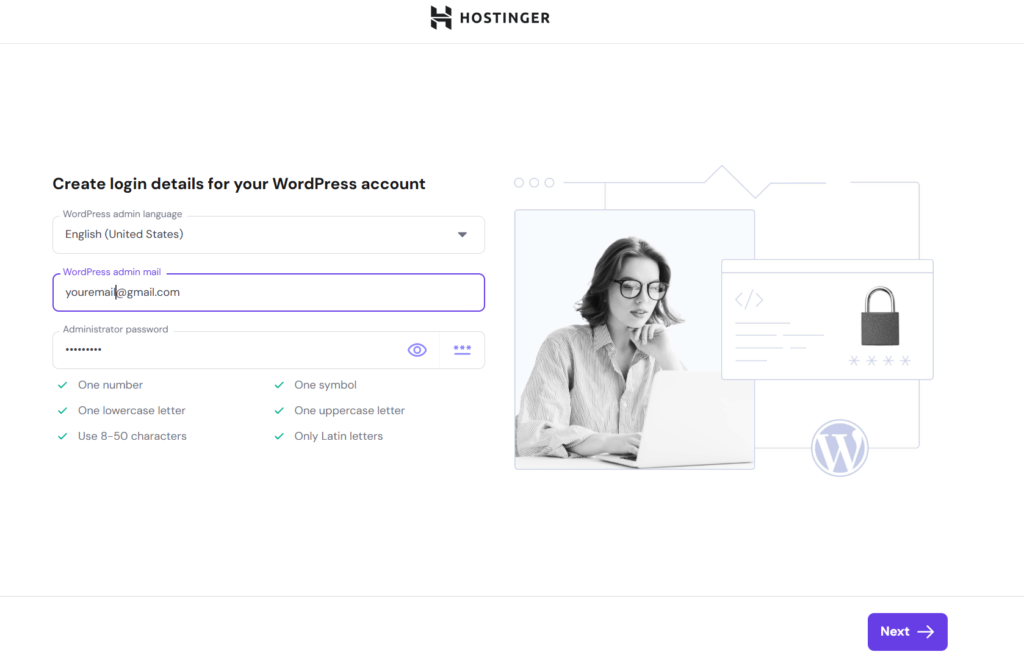
Just click on it, then:
Create your admin account
Add your email address
Select your website name
Then simply click Install, and your WordPress will be automatically installed.
See? Installing WordPress is that easy.
Should You Start a Free Blog or Invest a Little?
Starting a free blog means you’ll have to compromise on some things. If you want to start a blog without using WordPress.org, Blogger is a good option.
You can also monetize on Blogger. You can earn from ads by connecting your Google AdSense account. Blogger can also be customized, and you can easily find free and premium Blogger themes online. Many websites offer Blogger themes that you can use to improve your blog’s design.
But remember one important thing: As soon as you feel you can earn money from blogging and your blog is well set up, it’s best to migrate to WordPress.org as soon as possible. This is the recommended solution for long-term blogging and professional growth.
FAQ
Can a site be migrated from Blogger to WordPress?
Yes, absolutely possible. First, purchase hosting and install WordPress on it. After installation, go to Settings → Import in your WordPress dashboard and install the Blogger importer.
Then, go to the Blogger settings section, download your blog’s backup/export file, and import it into WordPress. This will transfer all your articles to WordPress. After that, all you need to do is set up proper redirection, and your Blogger blog will be successfully migrated to WordPress.
Which Hosting is Recommended as a Beginner?
I personally recommend Hostinger for beginners. I’ve been using Hostinger for the past five years, and all my websites are hosted there. It’s cheap, reliable, and you can even purchase hosting in local currency.
I haven’t personally used other hosting companies yet, so I can’t comment much on their features and pros and cons. I recommend Hostinger because I haven’t faced any major issues with it so far. I mentioned one issue earlier when I purchased the hosting through an affiliate link and couldn’t claim the money-back guarantee.
Other than that, I haven’t faced any other issues with Hostinger. And when there is an issue, their help is very good and AI help is also available, they help you with this, whatever the issue, they fix it for you.
I hope all your doubts are cleared up now. I told you how to start a free blog without investment and explained its pros and cons.
If you found this article useful, don’t forget to share it.

Ghulam Muhiudeen is a passionate blogger, SEO specialist, and online earning expert. He started his career with freelancing and provided content writing and website designing services on Fiverr from 2022 to 2024. During this time, he experienced firsthand the market’s intense competition, algorithm changes, and inconsistent income.