Hello!
I am Ghulam Muhiudeen, and I have been blogging for the past five years. If you want to write clear, easy-to-read articles that rank on Google and keep readers engaged until the end, it is very important to have a good rating tool. Bad grammar, long and confusing sentences, and poor readability damage your content.
No matter how good the idea is, your article remains low-value content.
In this article, I am going to tell you everything about Hummingbird vs. Grammarly in a simple way. I will compare the feature pricing and real-world use cases of both tools so you can make a smarter decision for your blog and make your article more readable to your audience.
- Related Topic: Grammarly vs ChatGPT
Grammarly vs Hemingway — Which is Better for Bloggers?
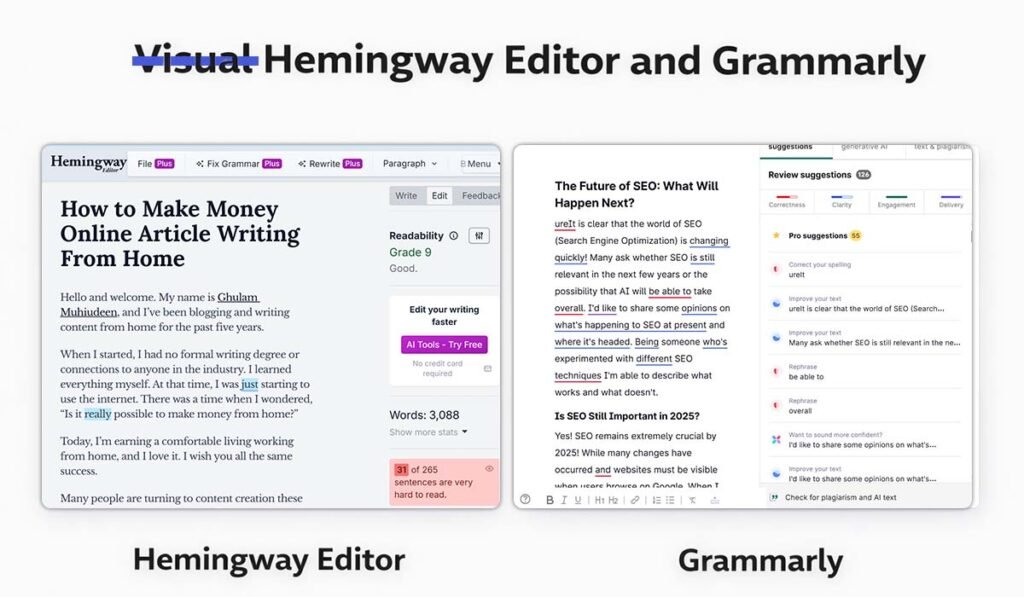
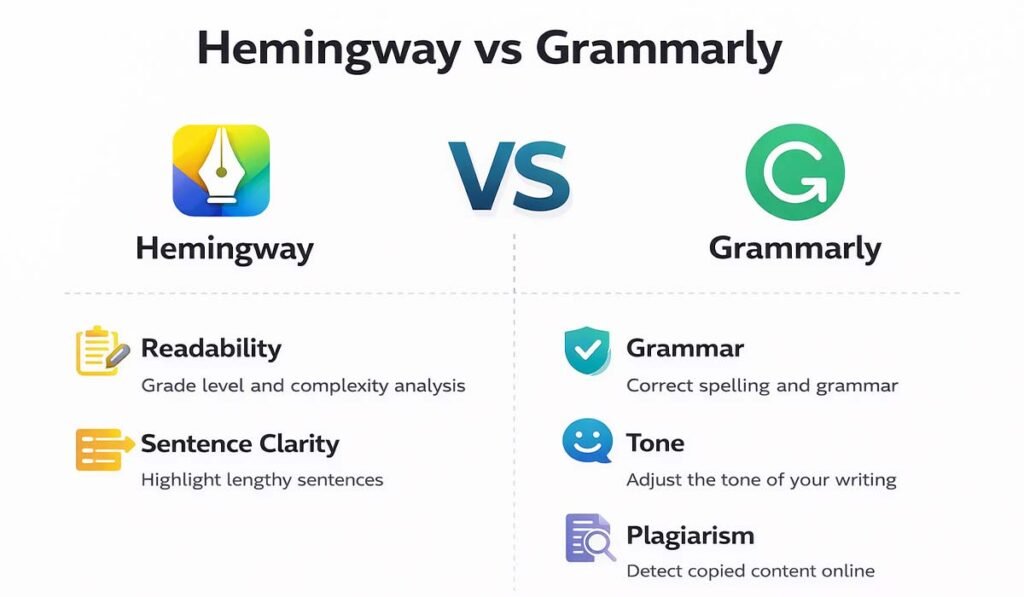
Hemingway Editor improves your writing style by highlighting complex sentences, passive voice, and hard-to-read paragraphs. Grammarly fixes grammar, spelling, punctuation, and tone errors. Hemingway makes your writing clear. Grammarly makes your writing correct. Most bloggers get the best results by using both tools together.
What is Hemingway Editor?
Hemingway Editor is a writing tool named after legendary writer Ernest Hemingway. He was famous for his short, punchy, and very clear writing style. Hemingway Editor follows the same philosophy. It encourages you to write in a simple and powerful way.
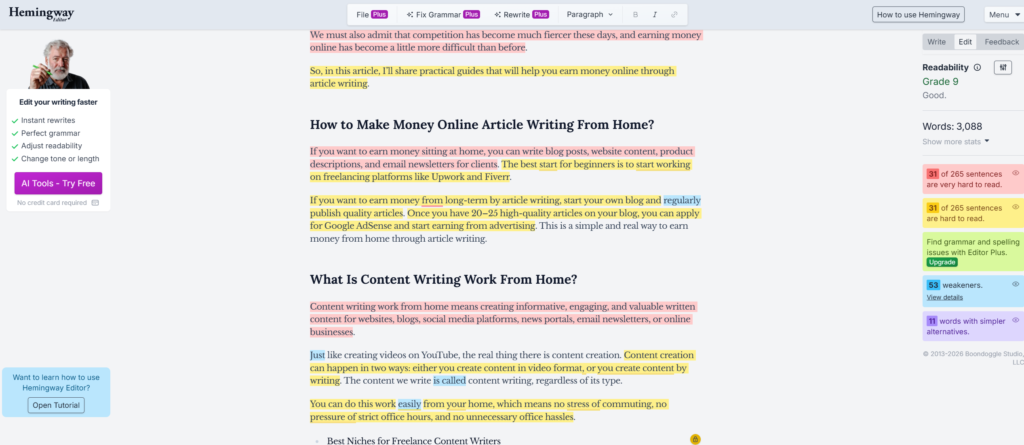
I first used it when I felt my blog posts were becoming a bit difficult to read. Readers would leave the page after just a few seconds. When I pasted my article into Hemingway, I realized where the problem was. Half of my sentences were highlighted in red and yellow, indicating they were too complex.
What Does Hemingway Editor Do?
Highlights hard-to-read sentences in yellow
Highlights very hard-to-read sentences in red
Flags passive voice usage
Marks adverbs you can cut
Gives your text a readability grade level
Counts your words, sentences, and paragraphs
The goal of this tool is simple: make each sentence so simple that even a sixth-grade reader can understand it. This doesn’t mean that you diminish the value of your content by simplifying it. It simply means that you respect your readers’ time and brainpower and make the content easy to read.
Hemingway is a free tool. It’s available in web form at hemingwayapp.com and also has a one-time paid desktop app. But honestly, the web version is usually enough for most bloggers, especially if you’re just starting out.
Who Should Use Hemingway?
Bloggers who write long-form articles
Writers who tend to use complex, academic language
Anyone who wants to improve their content’s readability score for SEO
Beginners who want instant visual feedback on sentence quality
What is Grammarly?
Grammarly is a very popular website that is used by many content writers and bloggers. It is not limited to readability only. Grammarly also checks your grammar, spelling, punctuation, tone, clarity and even plagiarism. It is like a professional editor swearing in your content writing. When I write for a client, I prefer Grammarly over just using Hemingway.
The reason is simple. Clients expect zero errors. Grammarly catches mistakes that I don’t notice myself, such as spelling mistakes, commas, wrong word choices, or chord phrasing. So when I need a professional work, I prefer Grammarly because Grammarly is a powerful writing assistant.
What Does Grammarly Do?
Fixes grammar and spelling errors in real time
Checks punctuation and sentence structure
Detects your writing tone (formal, casual, confident, etc.)
Offers vocabulary enhancement suggestions
Checks for plagiarism (Premium feature)
Works across browsers, Microsoft Word, Google Docs, and more
Provides a writing score and goal-setting feature
Grammarly has a free version, but its paid version is also available where you can analyze and rewrite your content in more detail. When you upgrade to the paid version, many features are unlocked, but if you are just starting out, you can also start with the free version.
Who Should Use Grammarly?
Bloggers who write in a non-native language
Freelance writers who deliver work to clients
Content writers who need their work to sound polished and professional
Anyone publishing on multiple platforms using different devices
Hemingway vs Grammarly: Full Comparison Table
This is a quick comparison table showing Hemingway vs Grammarly.
Feature | Hemingway Editor | Grammarly | Winner |
|---|---|---|---|
Grammar Check | Basic | Advanced (AI-powered) | Grammarly |
Readability Score | Yes (grade level) | Limited | Hemingway |
Sentence Simplification | Excellent | Moderate | Hemingway |
Plagiarism Checker | No | Yes (Premium) | Grammarly |
Tone Detector | No | Yes | Grammarly |
Free Version | Yes (web, limited) | Yes (basic) | Tie |
Paid Plan | $19.99 one-time | ~$12/month | Hemingway |
Word Processor Integration | No | Yes (everywhere) | Grammarly |
Passive Voice Detection | Yes | Yes | Tie |
Best For | Clarity & style | Grammar & spelling | Depends on need |
As you can see, both tools, Grammarly vs. Hemingway, serve different purposes. Grammarly is better in grammar and depth, while Hemingway is top in readability and simplicity.
When used together, they cover everything.
What is the Difference Between Hemingway and Grammarly?
This is the question I get asked the most. The short answer: Hemingway fixes HOW you write. Grammarly fixes WHAT you write.
Hemingway focuses on your writing style. It pushes you toward shorter sentences, active voice, and simpler vocabulary. It is a readability tool at its core. Think of it as your style coach.
Grammarly focuses on correctness. It catches grammatical mistakes, wrong word usage, awkward phrasing, and tonal issues. Think of it as your grammar teacher and proofreader combined.
Key Differences at a Glance
Purpose: Hemingway = readability. Grammarly = correctness.
Depth: Grammarly is deeper and more feature-rich overall.
Interface: Hemingway is a simple text editor. Grammarly works inside your existing tools.
AI Capability: Grammarly uses advanced AI to understand context. Hemingway uses rule-based highlighting.
Price: Hemingway charges once. Grammarly charges monthly.
In my experience, if I had to pick only one for a beginner, I would say start with Grammarly. But once you find your writing getting too complex or wordy, I use Hemingway to make my Content Readable.
Should Bloggers Use Grammarly or Hemingway?
Honestly? Both. But let me explain why, based on what kind of blogger you are.
Use Grammarly If You…
Want real-time grammar corrections while you write
Write in a second language and need accuracy help
Publish on multiple platforms and want a tool that follows you everywhere
Need to check for plagiarism before publishing
Are writing for clients or brands where errors are unacceptable
Use Hemingway If You…
Tend to write long, complex sentences
Want to improve your blog’s readability score
Are writing SEO content where simple language helps more readers
Want to build a clear, conversational writing style
Write beginner-friendly tutorials or how-to guides
For my own blogs at mohirdo.com and bloggingjobshub.com, I use both. I write in Google Docs with the Grammarly extension active, then paste the final draft into Hemingway for a readability check before publishing. These two steps help me fix mistakes in my blogs.
Is Hemingway Good for Blog Writing?
Yes, but your opinion may be different. Let me tell you from my personal experience.
When I started using Hemingway consistently, my average reading time increased. Readers spend longer reading my articles because my content is easier for them to understand, and this has proven to be very helpful for me.
What Hemingway Does Well for Blogs
Trains you to write at a Grade 6-8 reading level, which is ideal for general audiences
Builds your instinct for sentence length and complexity over time
Helps you cut unnecessary adverbs and filler words that weaken your writing
Makes your content feel more human and less robotic — great for E-E-A-T signals
The most important thing I want to mention here is that Hemingway tells you which sentences are complex. It does highlight them, but you have to buy the Plus version. You can also fix grammar and read them, but you need to have a plan for that.
The best use case for this is that you paste your content into Hemingway, and it will highlight in red and yellow the sentences that need to be changed. Then copy and paste those sentences into Grammarly and fix them, or read and improve them yourself. Hemingway will tell you if these sentences could be better, and Grammarly will help you fix them.
If you can’t afford or don’t want the Plus version, you can use the free version to identify which sentences need to be changed and fix them with Grammarly’s help.
Plus, you can also get help from AI. AI means you can give your content to the editor, and if you need grammar fixes, AI will help. But it’s better to do some of the work yourself and use Grammarly.
If you use a mix of tools, you’ll be able to easily manage and improve your content. It’ll be quite easy. Don’t rely on just one.
Hemingway Editor vs Grammarly: Price and Features for New Writers
If you are just starting out and money is tight (been there!), here is the honest breakdown of what you get for free versus what you need to pay for.
Hemingway Pricing
Free web version: Available at hemingwayapp.com with full readability features
Desktop app: One-time payment of $19.99 for Mac and Windows — no subscription ever
What you miss on free: Export options and offline access are desktop-only
For a new blogger, the free Hemingway web tool is more than enough. You get the full readability analysis with no time limit and no account needed.
Grammarly Pricing
Free version: Basic grammar, spelling, and punctuation checks
Premium: Around $12 per month (with annual billing) — unlocks tone, clarity, vocabulary, and plagiarism features
Business: Team collaboration features for agencies
The free version of Grammarly is genuinely useful. I used it for my first year of blogging before upgrading. But once you start writing for clients or scaling your blog output, Premium pays for itself quickly.
My Recommendation for New Writers
Start with Grammarly Free plus the Hemingway web tool. Both are completely free. Use them together and you will already be writing better than 80% of bloggers out there. When you start earning from your blog, upgrade Grammarly to Premium.
Can You Use Hemingway and Grammarly Together?
Absolutely — and this is actually what I recommend to every blogger I mentor. The two tools do not overlap much. They complement each other perfectly.
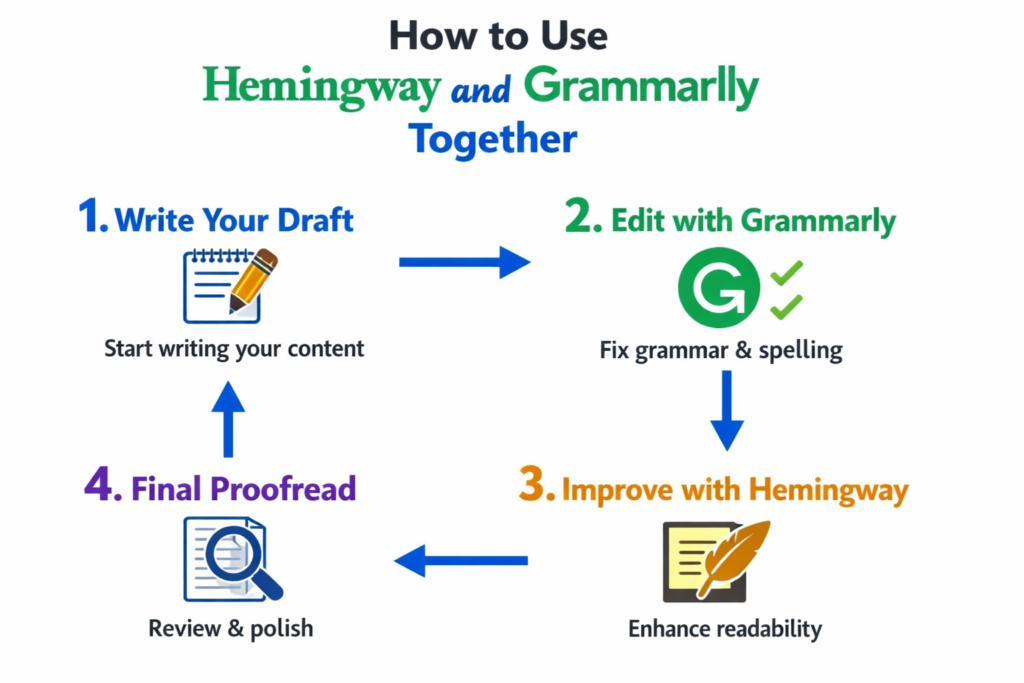
Here is the exact workflow I use for every article I write:
Step 1: Write your draft in Google Docs with the Grammarly extension active. Fix grammar and spelling as you go.
Step 2: Once your draft is ready, copy the text into Hemingway Editor. Look at the grade level and fix any sentences highlighted in red or yellow.
Step 3: Paste the improved text back into your document. Do a final Grammarly pass to make sure nothing new broke.
Step 4: Publish with confidence.
This workflow has saved me from so many embarrassing mistakes. Grammarly catches the errors. Hemingway catches the complexity. Together, they produce cleaner, more readable, and more SEO-friendly content.
Which Tool is Best for Content Writers?
If you are a content writer working with clients, the stakes are higher. You cannot afford grammar mistakes, and your readability needs to match the target audience. Here is my honest opinion:
For Freelance Writers: Grammarly Premium
Grammarly Premium is worth every penny for freelancers. The tone detection feature alone has saved me multiple times from sending a draft that sounded too casual for a formal client. The plagiarism checker protects you legally. The vocabulary suggestions make your writing richer without sounding forced.
For In-House Bloggers: Hemingway + Grammarly Free
If you run your own blog and are not writing for clients, you can get excellent results with Hemingway plus Grammarly’s free plan. Focus on readability first — that is what moves the needle for audience retention and time-on-page, which are indirect SEO signals.
Building Topic Authority With the Right Writing
Something most bloggers overlook: the quality of your writing directly impacts your topic authority. When your articles are clear, well-structured, and easy to read, readers trust you more. They come back. They link to you. These are the real E-E-A-T signals that Google loves — experience, expertise, authoritativeness, and trustworthiness built one well-written article at a time.
Using Hemingway and Grammarly together means you are constantly improving your writing quality. Over months and years, that compounds into a stronger brand and better search rankings.
Hemingway vs Grammarly: Frequently Asked Questions
1. Is Hemingway Editor free?
Yes, the web version of Hemingway Editor at hemingwayapp.com is completely free to use. You get full access to the readability scoring, sentence highlighting, and word count features. The paid desktop app costs a one-time fee of $19.99 and offers offline use and export options.
2. Does Grammarly work in Google Docs?
Yes. Grammarly has a dedicated Google Docs integration that works as a browser extension. Once you install it, Grammarly runs in the background as you write and flags issues directly inside your Google Doc in real time.
3. Which tool is better for non-native English writers?
Grammarly is the better choice for non-native English speakers. It catches subtle grammar errors, wrong prepositions, and unnatural phrasing that someone writing in their second language might miss. Hemingway is more about style than correctness, so it is less useful as a primary tool when you are still building grammatical accuracy.
4. Can Hemingway replace Grammarly?
No — and I would not recommend trying. Hemingway does not check grammar or spelling at all. It only evaluates readability and style. Grammarly is far more comprehensive in terms of error detection. Use Hemingway to improve your style after Grammarly has already cleaned up your mistakes.
5. Is Grammarly Premium worth it for bloggers?
In my experience, yes. If you publish content regularly and want professional-quality writing, Grammarly Premium is worth the investment. The tone detection, vocabulary suggestions, and plagiarism checker are features that genuinely improve your content. If you are just starting out, the free version is a great starting point.
6. Which tool helps more with SEO?
Both tools help SEO indirectly. Hemingway improves readability, which reduces bounce rate and increases time-on-page — both are positive engagement signals. Grammarly ensures error-free writing, which builds credibility and trust. Better content naturally earns more links and social shares, which are direct SEO ranking factors. Neither tool directly handles keyword research or on-page SEO — for that, you need a separate SEO tool.
Final Thoughts: Hemingway vs Grammarly
After five-plus years of blogging and testing every tool in the market, my verdict is simple: do not choose between Hemingway and Grammarly. Use both.
Grammarly makes sure your writing is correct. Hemingway makes sure your writing is clear. You need both to produce content that is actually good — content that ranks, keeps readers engaged, and builds your reputation as a trusted voice in your niche.
If you are brand new and watching your budget, start with the free version of both. Hemingway’s web tool is completely free. Grammarly’s free plan catches the big mistakes. As your blog grows and your content output increases, upgrade Grammarly to Premium.
The best bloggers are not just good writers. They are smart writers who use the right tools to make their work better, faster, and more impactful. Now you have everything you need to make the right choice.
Now I want to hear from you! Which tool do you use — Hemingway, Grammarly, or both? Drop your experience in the comments below. If you found this guide helpful, share it with a fellow blogger who could use the same clarity. And if you want more blogging tips, tools, and honest reviews, stick around — I publish new content regularly on bloggingjobshub.com.

Ghulam Muhiudeen is a passionate blogger, SEO specialist, and online earning expert. He started his career with freelancing and provided content writing and website designing services on Fiverr from 2022 to 2024. During this time, he experienced firsthand the market’s intense competition, algorithm changes, and inconsistent income.